For WordPress sites
Google reviews for your WordPress site.
ReviewPine shows your Google reviews on WordPress with a free plugin from the WordPress.org plugin directory and a shortcode, or with one line of code in a Custom HTML block. It works with the block editor, Elementor, Divi and other page builders, widget areas and caching plugins. The widget loads after your page and sets no cookies, and setup takes about five minutes.
Last updated
- 1 widgetfree forever
- No cardneeded
- No cookiesfor visitors
- 5 minutesto set up
What our guests say
Is it right for you?
Who ReviewPine suits, and who it does not.
A quick, honest check before you sign up.
Good fit if
- You run self-hosted WordPressInstall the plugin from WordPress.org, connect your account and paste a shortcode. No code to copy.
- You build with a page builderUse the Shortcode or HTML element in Elementor, Divi, WPBakery, Beaver Builder and others.
- You care about speed and cachingThe widget loads after your page from our network, so your pages stay fully cacheable. The plugin adds nothing to pages without a widget.
- You want a badge on every pageEdge-of-page widgets such as the floating badge can show on every page with one click, with no shortcode.
- You build sites for clientsManage every client's business from one account, or join the partner programme.
Not the right fit if
- Your WordPress.com plan does not allow plugins or custom codeThen neither the plugin nor the code can be added. Self-hosted WordPress works on any hosting.
- You want reviews of WooCommerce productsReviewPine shows the Google reviews of your business, not product reviews from buyers.
- You want reviews from other review sitesReviewPine shows Google reviews only. If most of your reviews live on another site, it will not show them.
- You need reviews saved as posts in WordPressReviews are served by the widget and update by themselves; they are not copied into your WordPress database.
How it works
Live on your website in about five minutes.
No Google login. No API keys. No developer.
1. Install the free plugin
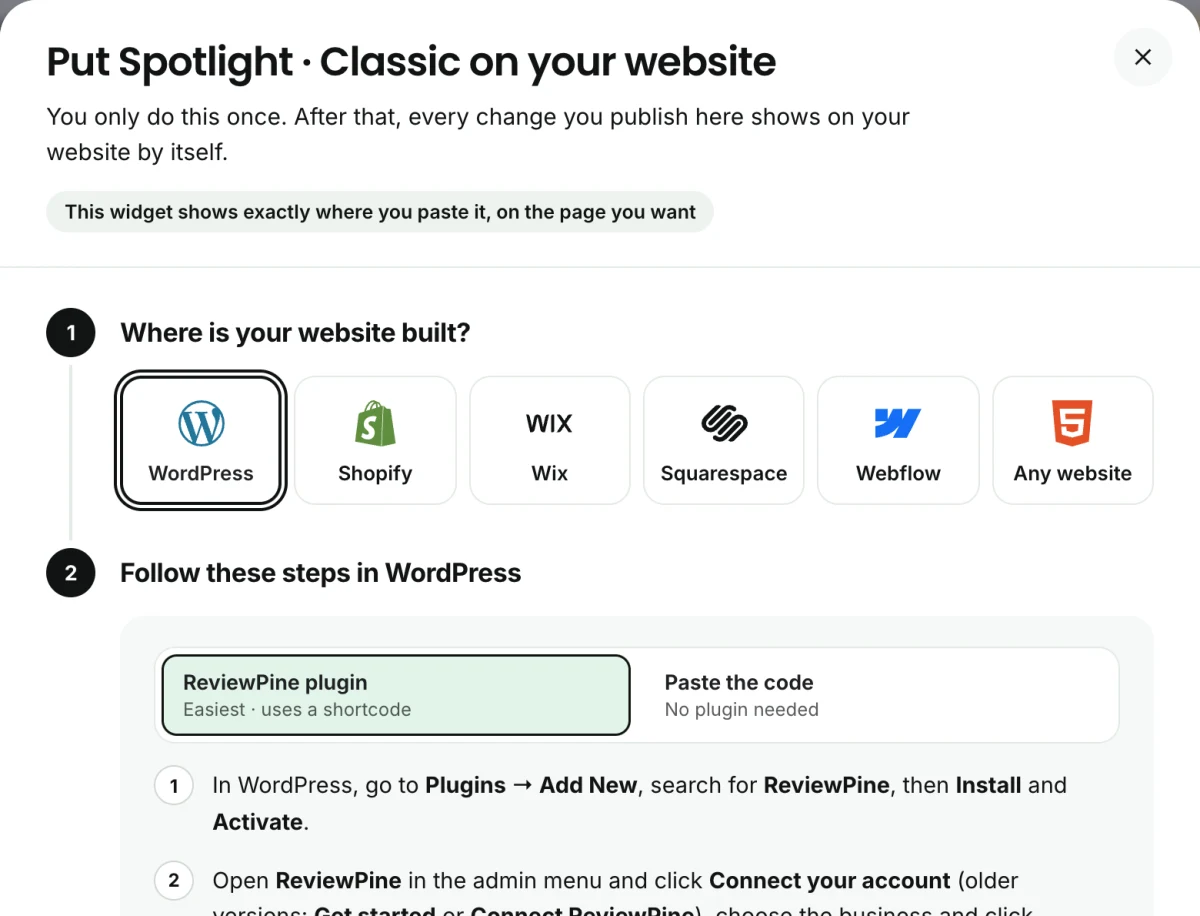
In WordPress, open Plugins, Add New Plugin, search for ReviewPine and click Install Now, then Activate.
2. Connect and add your business
Click Create free account or Connect your account, then find your business by name or Google Maps link.
3. Paste the shortcode
Copy the widget's shortcode in the plugin and paste it into any page, post or widget area.
1 widget free forever · No card needed · Set up in about five minutes
Works the WordPress way.
A plugin and a shortcode for people who like WordPress as it is, one line of HTML for everyone else.
- ShortcodesEach widget gets its own shortcode, listed in the plugin with a preview.
- Read-only connectionThe plugin can list your widgets. It cannot change anything in your ReviewPine account, and you can disconnect at any time.
- Design changes show by themselvesChange the layout or colours in ReviewPine and your site updates. Nothing to paste again.
- Or no plugin at allPaste the widget code into a Custom HTML block or your page builder's HTML element.
Pricing
Simple yearly plans. Every feature on each one.
Every feature is free for 7 days, with no card needed. After that, one widget can stay live for free with your 10 newest 4 and 5 star reviews. Paid plans differ only in how many businesses they cover.
One business per website is the usual setup. Several sites for several businesses add one business each. Compare every plan
Manage reviews for clients? See the partner programme for agencies
FAQ
Questions, answered.
Step-by-step guides in the Help Centre:
Is the WordPress plugin free?
Yes. The plugin is free on the WordPress.org plugin directory. It needs a ReviewPine account, which starts with a free trial.
Do I need the plugin?
No. The plugin lists your widgets and gives you shortcodes, but you can also paste the widget code into a Custom HTML block or a page builder's HTML element.
Does it work with Elementor and other page builders?
Yes. Use the Shortcode element with the plugin, or the HTML element with the widget code.
Will a caching plugin cause problems?
No. Your pages can stay cached: the widget loads its reviews in the visitor's browser. If you have just added a widget and do not see it, clear the cache once.
Does it work on WordPress.com?
Yes, on a WordPress.com plan that allows plugins or custom code. Self-hosted WordPress works on any hosting.
Your reviews are already earning trust on Google. Put them to work on your website.
1 widget free forever, and every layout free for 7 days. No card, no code skills, no catch.