How Reviews Increase Website Conversion Rates (and How to Measure It)
Reviews turn interested visitors into enquiries because they answer the question your own copy can't: "will this work out for someone like me?" The evidence, the psychology, and a simple way to measure the lift on your own site.
On this page
Key takeaways
- Reviews convert because they replace your claims with customers' evidence at the moment of decision.
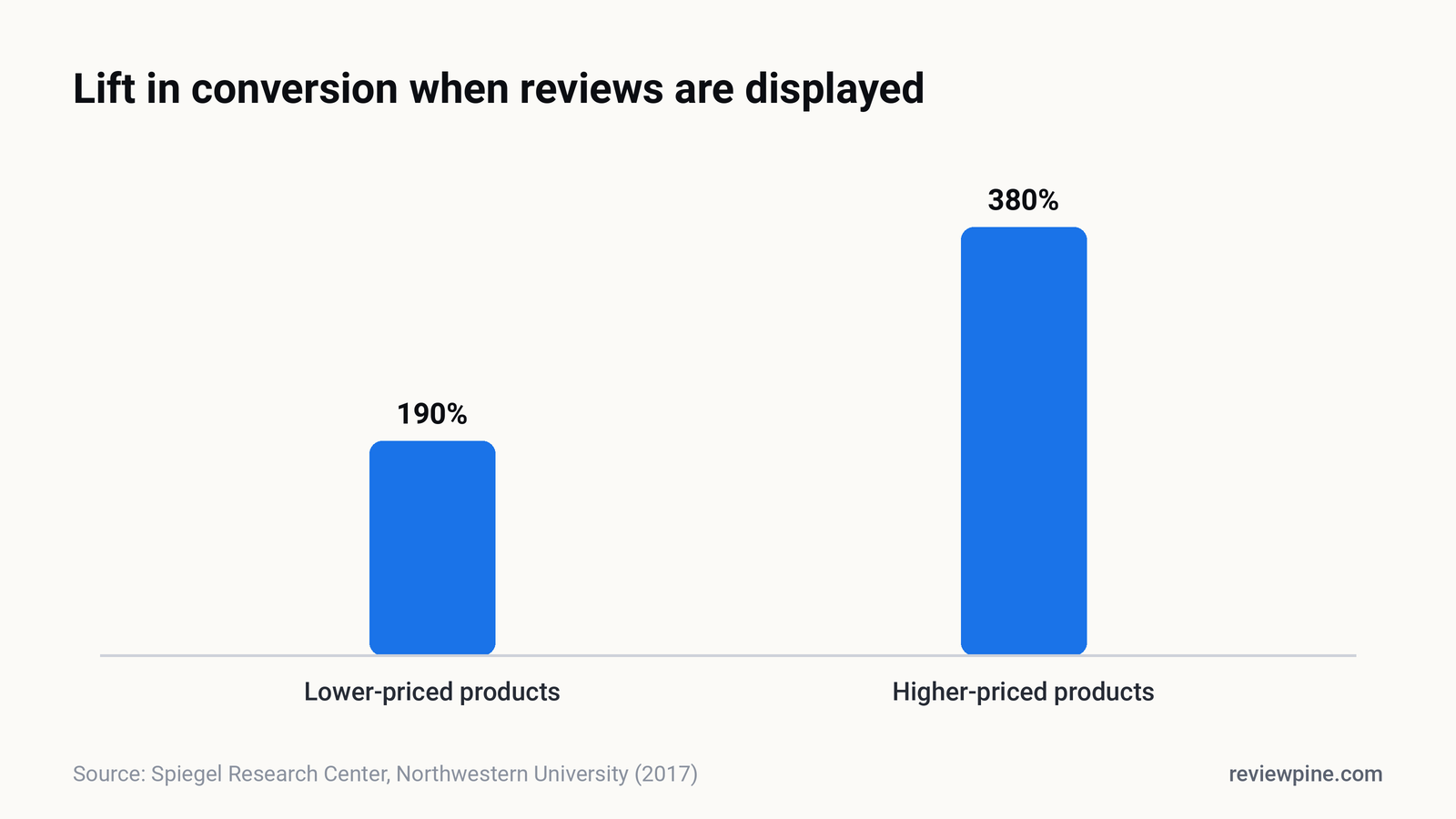
- Spiegel Research Center found reviews raised conversion 380% for higher-priced and 190% for lower-priced products.
- 54% of consumers visit a business's website after reading positive reviews (BrightLocal, 2026).
- Recent, specific, consistent reviews convert best; match reviews to the page's purpose.
- Measure the lift yourself with a before-and-after comparison or an A/B test.
Showing reviews on your website increases conversion rates because it replaces your claims with other customers' evidence at the moment a visitor is deciding. Northwestern University's Spiegel Research Center found that showing reviews raised purchase likelihood sharply, with a 270% increase for products with five reviews compared with none, and a larger effect for higher-priced items (380%) than lower-priced ones (190%). For local services, where buyers can't judge quality in advance, the effect is often even more important.
This guide covers why reviews convert, which reviews convert best, and how to measure the difference on your own site rather than taking anyone's word for it.
What does the research say?#
The most useful study for website owners comes from Northwestern's Spiegel Research Center, which worked with millions of product page views. Its key findings:
- Displaying reviews increased the likelihood of purchase substantially, and most of the gain came from the first few reviews.
- The effect was larger for higher-priced products: conversion rose 380% for higher-priced items versus 190% for lower-priced ones when reviews were shown.
- Purchase likelihood peaked for average ratings around 4.0 to 4.7 and declined as ratings approached a perfect 5.0.
BrightLocal's 2026 consumer survey shows the same pattern for local businesses: 85% of consumers are more likely to use a business after reading positive reviews, and 54% visit the business's website afterwards. That visit is your conversion opportunity, and it's where most websites stop showing proof.
Why do reviews convert visitors?#
They reduce perceived risk#
Every enquiry involves a small risk for the buyer: wasted time, a bad experience, money spent on the wrong provider. Reviews shrink that risk by showing that people like them took the same step and were glad they did.
They're social proof#
People look to others' behaviour when they're uncertain. The psychologist Robert Cialdini called this social proof, and reviews are its most concrete form online: named people, real dates, specific outcomes.
They answer objections you can't#
Your website can say "we're always on time". A review saying "turned up at 9am sharp, as promised" is more believable because it isn't you saying it. Reviews quietly answer objections you might not even know visitors have.
They're specific#
The best reviews contain detail: the problem, the person who helped, what happened next. Detail is persuasive because it's hard to fake and easy to picture.
Which reviews convert best?#
| Review type | Why it converts | Where to use it |
|---|---|---|
| Recent reviews (last few weeks) | Proves you're good now, not just in the past | Homepage, near forms |
| Reviews mentioning a specific service | Matches the visitor's exact need | That service's page |
| Reviews about responsiveness and reliability | Answers "what happens after I enquire?" | Next to contact and booking forms |
| Reviews mentioning price or value | Reduces sticker shock | Pricing page |
| Reviews describing a problem solved | Mirrors the visitor's situation | Landing pages for ads |
| Detailed reviews with names | Feel authentic and verifiable | Everywhere |
BrightLocal found that what most makes a review trustworthy is that it's backed up by other reviews with similar sentiment (56%), followed by describing a positive experience (46%), being posted within the last month (44%) and a high star rating (42%). A set of consistent, recent reviews beats one glowing outlier.
How much will reviews lift my conversion rate?#
Honestly, it depends on your traffic, your offer, your current site and how you show the reviews. Anyone quoting a precise uplift for your business is guessing. What you can do is measure it, which is better than any industry average.
Example: Imagine a physiotherapy clinic whose booking page gets 2,000 visits a month and converts 3% of them, 60 bookings. If adding reviews beside the booking form lifted conversion to 3.6%, that's 72 bookings: twelve extra patients a month from the same traffic and the same ad spend. The numbers here are hypothetical; the point is that small conversion gains compound into real revenue.
How to measure the impact on your own site#
You don't need complex tools. A simple before-and-after or A/B approach works for most small businesses.
Option 1: Before and after#
- Note your conversion rate (enquiries, bookings or sales divided by visits) for the four weeks before adding reviews.
- Add reviews to the key pages.
- Compare the next four weeks, ideally against the same period last year to account for seasonality.
It's not perfect science, but for a small business it gives a useful signal.
Option 2: A/B test#
If you have enough traffic (a few thousand visits a month to the page), show half of visitors the page with reviews and half without, using an A/B testing tool. Run it until each version has a meaningful number of conversions, not just a few days. Testing tools usually tell you when results are statistically reliable.
What to track#
| Metric | Why |
|---|---|
| Conversion rate on the page | The main outcome: did more visitors act? |
| Form starts versus form completions | Shows whether reviews reduce last-minute drop-off |
| Clicks on phone numbers or WhatsApp links | Many local enquiries never touch a form |
| Time on page and scroll depth | Signals whether visitors are reading the proof |
| Clicks on "Write a review" | Shows returning customers engaging |
Common mistakes that waste the effect#
| Mistake | Fix |
|---|---|
| Reviews only on a testimonials page | Put them next to decisions; see where to put reviews |
| Old reviews with no dates | Show recent reviews; 74% of consumers only care about the last three months |
| Anonymous quotes with no source | Show real names, dates and the Google source |
| Hiding the overall rating | Show rating and count for context and credibility |
| A slow widget that hurts page speed | Use a lightweight, lazy-loading widget |
| Ignoring mobile | Check placements on a phone, where most visitors are |
Does a perfect rating convert better?#
Not necessarily. The Spiegel research found purchase likelihood peaked between about 4.0 and 4.7 and fell towards 5.0, because perfect scores look too good to be true. A believable mix with thoughtful replies tends to convert better than perfection. We explore this in is a perfect 5-star rating bad for business?
Put reviews to work this week#
- Pick the one page that matters most for enquiries.
- Add three to six recent, relevant Google reviews near the main button, with your overall rating.
- Note your conversion rate now, and compare in four weeks.
ReviewPine makes step 2 a two-minute job: it shows your live Google reviews in the layout of your choice, with your overall rating and count, loads lazily so it won't slow your page, and refreshes automatically. Start with how to add Google reviews to your website.
Frequently asked questions
Do reviews increase conversion rates?
How much do reviews increase conversions?
Which reviews should I show to increase conversions?
Where should reviews go to increase conversions?
Will a reviews widget slow my site and hurt conversions?
Turn your Google reviews into your best salesperson
Show real, always-fresh Google reviews on any page of your website, with a "Write a review" button that brings in new ones. Set up in about two minutes.
- Works on WordPress, Shopify, Wix and any site
- Updates itself every day
- No cookies, no slowdown
Anjanee Shukla
Founder, Ainygo Technologies
Anjanee Shukla is the founder of Ainygo Technologies and has been working in the technology industry for over 15 years. He has helped businesses worldwide by developing more than 1,000 websites, web applications, and digital solutions. His expertise spans WordPress, web development, website maintenance, hosting, automation, and business technology. Through this blog, he shares practical advice, technical knowledge, and real-world solutions gained from years of hands-on experience.