Can You Display Google Reviews Without Managing an API Key?
What a Google API key actually does, what building it yourself involves, and how a Google reviews widget without an API key works, including the work that still happens behind it.
On this page
- What a Google API key really is
- Building it yourself on the Places API
- Is there an official way to get all your reviews?
- The three routes side by side
- What changes when the key is someone else's problem
- How a Google reviews widget without an API key works in ReviewPine
- When I'd still build it myself
- Next step
Key takeaways
- A hosted widget shows your Google reviews with no Cloud project, billing account or API key on your side.
- Places API: at most 5 reviews per place, sorted by relevance, and the reviews field bills at the top Place Details tier.
- Hand-built integrations have to follow Google's attribution, linking, ordering notice and caching rules.
- The Business Profile API lists every review, but only for approved projects and profiles you manage.
- No key for you means the provider does the data work, not that every review can always be fetched.
Yes. With a hosted Google reviews widget you never touch an API key: no Google Cloud project, no billing account, nothing to paste into your site or protect. You find your business by name or paste its Google Maps link, choose a layout and copy one line of code. For most small businesses, a Google reviews widget without an API key is the route I'd recommend, and I say that as a developer who is perfectly happy writing API code.
There's one distinction I always make for clients, though. "You don't manage a key" isn't the same as "no API is involved." Somebody still has to get the reviews from Google, store them, refresh them and display them under Google's rules. A hosted widget moves that job from you to the provider. It helps to know what the job is before you decide who should do it.
What a Google API key really is#
An API key is a long string that identifies your Google Cloud project whenever your code asks Google for data. Google uses it to authenticate the request and to bill the right account. Google's setup guide for the Places API (New) says the key only works once the project has a billing account and the API is enabled, and it strongly recommends restricting every key to the APIs and websites that should use it (Set up the Places API (New)).
So I don't think of a key as a password. I think of it as a meter. Whoever owns the key owns the bill, the quota, and the problem if it leaks and someone else runs up charges on it.
Building it yourself on the Places API#
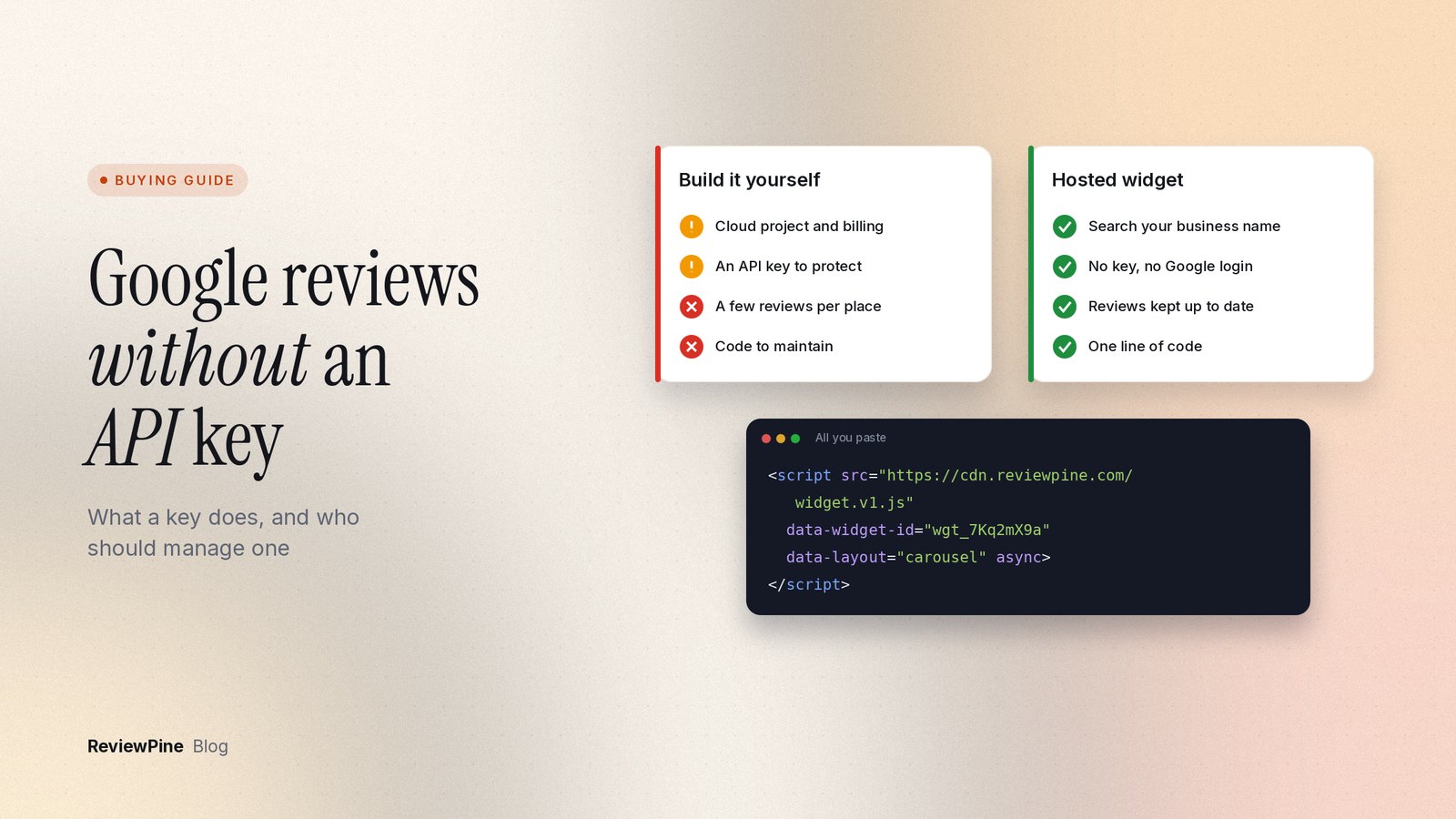
If you or a developer build the integration, the usual starting point is Google's Places API. The setup looks like this:
- Create a Google Cloud project and attach a billing account.
- Enable the Places API (New) for that project.
- Create an API key and restrict it to the Places API and to your server or website.
- Find your business's place ID (it starts with
ChIJ). - Call Place Details with a field mask that includes
reviewsandrating. - Write the code that turns the response into review cards on your page.
What comes back is smaller than most people expect. Google's reference for the Place object describes the reviews field as a list "sorted by relevance" and says a maximum of 5 reviews can be returned (Places API reference). You don't pick the five. Google does.
It's also the expensive part of the request. The Place Details guide lists reviews among the fields that trigger the Place Details Enterprise + Atmosphere SKU, the highest-priced tier for that call (Place Details (New)). Prices and free usage change, so look at Google's current pricing page before you estimate anything.
The display rules most DIY builds miss#
Fetching the reviews is the easy bit. Showing them correctly is where hand-built integrations usually fall short. Google's Places API policies require, among other things:
- author attribution for every review: the reviewer's photo, name and profile link when there's room, and at least the photo when space is tight;
- a link to each review on Google Maps, using the
googleMapsUrithe API returns; - a notice explaining how reviews are ordered and filtered, including any criteria you apply;
- the visit month and year for reviews of places in France;
- Google Maps attribution near the content (the logo, or the text "Google Maps" where space is limited);
- caching limits: the place ID can be stored indefinitely, but other Places content falls under the caching restrictions in the service terms.
None of that is hard for a competent developer. It just never ends. When Google renames a field, adjusts an attribution rule or moves a price tier (its attribution guidance is currently shifting from "Google" to "Google Maps"), somebody has to notice and update the code. On a small business site, that somebody is usually nobody.
Is there an official way to get all your reviews?#
There is, and it's what people mean when they say the owner can get every review. Google's Business Profile APIs include accounts.locations.reviews.list, which returns all reviews for a location you manage (Work with review data).
Getting in is the hard part. Google's prerequisites page says you need a Cloud project, an Organization account and an approved access request. To apply, you must manage a Business Profile that has been verified and active for 60 days or more, and have a website for that business. Requests go through a contact form, and a project that hasn't been approved shows a quota of 0 requests per minute. This API also uses OAuth, so instead of a simple key you sign in with a Google account that manages the profile.
That makes sense for agencies and software teams who also want to reply to reviews or manage listings in bulk. For a café that wants a review slider on its homepage, it's a lot of paperwork for a slider.
The three routes side by side#
| Places API (DIY) | Business Profile API (DIY) | Hosted widget | |
|---|---|---|---|
| Google Cloud project | You create it | You create it | Not needed |
| Billing account and key | Yours | Project plus OAuth sign-in | Not needed |
| Approval from Google | No | Yes, by application | Not needed |
| Access to your Google account | No | Yes | Not needed (with ReviewPine) |
| Reviews you can show | Up to 5, chosen by Google | All, for profiles you manage | Depends on the provider |
| Display rules and refresh | Your code | Your code | Provider's job |
| Can reply to reviews | No | Yes | Not with ReviewPine |
| Best for | Developers who need a few reviews in a custom app | Agencies and teams managing many profiles | Businesses that want reviews on their site with no build |
What changes when the key is someone else's problem#
I'd be wary of any tool that implies reviews appear by magic. A hosted widget is a service. Behind it, the provider retrieves public review data, stores it, refreshes it on a schedule and serves it to your visitors. How it sources that data, and whether it follows the rules that come with it, is the provider's responsibility.
For you, a few things go away. There's no bill from Google, because the provider's price covers its data costs. There's no key sitting in your page source for someone to copy. There's no code to fix when Google changes a field. And with ReviewPine specifically, there's no account access: you never sign in to Google or add us as a manager on your Business Profile. We only read public reviews.
Some things don't change at all. A widget can only show reviews Google lists publicly. Google stays the source of truth, so a review deleted on Google, by the reviewer or by Google, drops out after the next refresh. And nobody can promise every review every time. Sometimes Google shows a star rating and review count for a listing but doesn't list the reviews themselves, which happens with some new listings. A decent provider tells you when that's the case instead of showing an empty box.
When I'm sizing up any provider, I ask four things: how many reviews the widget can show, how often new ones arrive, what happens when Google lists none, and what visitors see if you stop paying. Our Google reviews widget explainer covers the rest of the checklist, and the widget buyer's scorecard turns it into a 30-minute test.
How a Google reviews widget without an API key works in ReviewPine#
This is the actual flow in our dashboard, as our Help Centre guide to adding a business describes it:
- Open Businesses and click Add a business.
- Start typing your business name. After 5 letters, matching Google listings appear; click yours. Or paste your Google Maps link (a
maps.app.goo.glshare link, a fullgoogle.com/maps/place/link or a place ID) and click Find my business. - Check the name and click This is my business.
- Your newest reviews usually arrive within a minute or two. The rest of your history imports in the background while you pick a layout.
- Copy the embed code and paste it into your site:
<script src="https://cdn.reviewpine.com/widget.v1.js" data-widget-id="wgt_abc12345" data-layout="carousel" async></script>
There's no key in that line. The widget ID just tells our script which design and which reviews to load. After that, paid plans add new reviews daily (plus a manual refresh once a day if you want one sooner), and any design change you save shows up on every page that has the code.
If an import finds a rating but no review text, the widget still shows the rating and review count, and we keep checking daily. Reviews missing or out of date lists what to look at.
Note: Our widget doesn't add review structured data to your page. Google doesn't show review stars in search for a business's own reviews on its own site, whether they come from an API build or a widget. More on that in review schema and star ratings.
When I'd still build it myself#
A hosted widget isn't always the answer. I'd build it, or tell a client to have it built, in these cases:
- You already have developers and Google Cloud billing, and you only need your rating and a handful of reviews inside a custom app or design system.
- You need to reply to reviews or manage listings in bulk. The Business Profile API does that and ReviewPine doesn't.
- You want reviews from many locations merged into one feed. ReviewPine shows one business per widget, so you'd create one widget per location instead.
- Your security policy bans third-party scripts. A server-side build that outputs plain HTML loads nobody else's code. (If you allow scripts under a strict Content Security Policy, ours needs
cdn.reviewpine.comallowed for scripts and connections, plus Google's image hosts for reviewer photos.)
For everyone else, I usually point out that an hour of developer time costs more than a year of a widget, and the maintenance keeps going after the build is done. If you're comparing free and paid widgets on that basis, the free vs paid comparison shows what each plan level displays.
Platform details checked on 23 October 2026.
Next step#
Want to see it with your own reviews? Start a free 7-day trial with every layout and the full customizer and no card. Type your business name, choose a layout from the widget gallery, and paste one line of code. Plans after the trial start at $19 a year for one business, with a free plan for one widget (see the pricing page).
Frequently asked questions
Do I need a Google API key to show Google reviews on my website?
Do I have to give a review widget access to my Google account?
Why does the Google Places API only show 5 reviews?
Is it safe to put a Google API key in my website's code?
Can a widget show every review I have on Google?
Turn your Google reviews into your best salesperson
Show real Google reviews on any page of your website, with a "Review us on Google" button that brings in new ones. On paid plans, new reviews appear by themselves. Set up in about five minutes.
- Works on WordPress, Shopify, Wix and any site
- Paid plans update by themselves
- No cookies, loads after your page
Anjanee Shukla
Founder, Ainygo Technologies
Anjanee Shukla is the founder of Ainygo Technologies and has been working in the technology industry for over 15 years. He has helped businesses worldwide by developing more than 1,000 websites, web applications, and digital solutions. His expertise spans WordPress, web development, website maintenance, hosting, automation, and business technology. Through this blog, he shares practical advice, technical knowledge, and real-world solutions gained from years of hands-on experience.