Free vs Paid Google Reviews Widgets: When Is Upgrading Worth It?
Free vs paid Google reviews widget, decided with eight yes or no questions. What free plans usually hold back, the moments that justify paying, and when free is enough.
On this page
Key takeaways
- A free plan, a free trial and a free tier with traffic limits are three different deals with different risks.
- Refresh frequency is the free limit that matters most; it decides how current your site's reviews look.
- Pay if you need fresher reviews, a second widget or location, or protection from a traffic limit.
- Stay free with one location, a few reviews a month and no objection to a small vendor link.
- No plan, free or paid, adds review stars to your own site in Google search or brings in new reviews by itself.
Most one-location businesses can stay on a free Google reviews widget for longer than vendors would like you to believe. I'd only pay once the free version starts costing you something real.
That's my short answer to free vs paid Google reviews widget. Stay free while the free widget shows enough recent reviews, refreshes about as often as new ones arrive, and carries branding you can live with. Pay when one of those breaks: your newest reviews are missing, you need a second widget or a second location, the standard design clashes with your site, or a limit starts hiding the widget from visitors.
This piece is only about that decision. If you're still comparing tools, my buyer's scorecard for choosing a Google reviews widget is the better place to start. Come back once you have a favorite.
Three different things called "free"#
Pricing pages use the word for at least three arrangements, and they carry different risks.
| What it's called | What you actually get | What to check |
|---|---|---|
| Free plan (free forever) | A permanent, limited version that keeps working with no payment | Exactly which limits apply, and whether the vendor can change them |
| Free trial | Every feature, for a fixed number of days | Whether a card is needed, and what happens on the last day |
| Free tier with usage limits | A free plan that works until you pass a traffic or usage threshold | What counts toward the limit, and what visitors see when you pass it |
The last day of a trial is where the surprises are. Some trials turn into a paid subscription automatically, because a card was taken at sign-up. Some drop you to a free plan. Some just switch the widget off. Read the trial terms before you put the code on a live page.
Note: ReviewPine's trial is 7 days with every layout and the full customizer, and needs no card. When it ends, the account moves to the Free plan by itself and one widget stays live. Nothing is charged unless you choose a plan. Details are in how the free trial works.
What free plans usually hold back#
Free plans across the industry tend to be limited along the same few lines. Not every vendor uses all of them, but these are the ones to look for:
- a small, fixed number of reviews, often only the newest;
- a pre-set selection, such as higher ratings only, with no filters of your own;
- slower refreshes, weekly or monthly instead of daily;
- a standard look, with your own colors, fonts and layout options kept for paid plans;
- a "powered by" or "free widget by" link on the widget;
- one widget and one business;
- on some free tiers, a monthly view limit, after which the widget stops showing;
- no extras such as a review button, pinned reviews, filters or support.
Each of these costs you something different. A branding link costs a little polish. A slow refresh costs credibility, because the reviews on your site fall behind the ones on your Google profile, and it's the limit owners notice last and visitors notice first. A traffic limit can cost you the widget itself, on the busiest day of your year.
Free vs paid Google reviews widget: eight questions#
Go through these honestly. A yes to any of the first four usually means paying makes sense. If your only yeses are in the last four, it comes down to taste and budget.
- Do new Google reviews come in faster than the free plan refreshes? If customers leave a few reviews a week and the free widget updates monthly, the newest reviews on your own site can be up to a month behind. Visitors do care about recent reviews; why review recency matters has the survey numbers.
- Do you need reviews on more than one page, in different layouts? A slider under the homepage headline and a short list beside the contact form are two widgets. Where to put reviews on your website explains why each page wants its own.
- Do you have a second location, or plan to? Each location has its own Google Business Profile, and free plans nearly always cover one.
- Could a traffic limit hide the widget? If the free tier caps views and you're about to run ads or a seasonal promotion, the cap can arrive exactly when the widget matters most.
- Does the standard design clash with your site? On a homepage, it shows. In a contact page footer, much less.
- Is the vendor link a problem? On a small business site, usually not. On a client site an agency built, or an ad landing page where everything is meant to push toward one button, it often is.
- Do you want to choose which reviews appear? Filters, sorting and pinning let you put a review about one specific service on that service's page.
- Do you want a button that sends visitors to your Google review form? It turns the widget into a small review collection tool as well.
When I'd stay free#
I'd rather you stay free and happy than pay and resent it. A free widget is enough when you run one business from one location with one main page, you get a handful of new reviews a month so a monthly refresh keeps things reasonably current, the reviews the free plan picks give a fair picture of you, and a small vendor link doesn't bother you. It's also the sensible choice if you're still testing whether reviews on the site make any difference at all.
Think of a sole trader with a one-page site and steady, positive reviews. Or a side business that only needs its homepage to look trustworthy. Neither needs to pay.
There's one fairness point for any free plan that shows only higher ratings, ours included. Picking which reviews to feature is normal, but your site shouldn't pretend that selection is the whole story. Google's own help pages say "a mix of positive and negative feedback often feels more trustworthy" (Tips to get more reviews). Make sure visitors can reach your full Google profile, and read whether a perfect 5 star rating helps or hurts before you lose sleep over one lower review.
What usually tips people into paying#
It's rarely a feature list. It's a moment.
A customer mentions the review they left last week and can't find it on your site. That's the refresh limit. Or you open a second branch and want each location page to show its own reviews. A redesign is another common one: the new site looks sharp and the standard widget suddenly doesn't match. Paid traffic is a big one too, because ad landing pages deserve your best layout, filtered reviews and no outside links. And when a web designer builds or rebuilds the site, they usually want the widget to look like it belongs.
ReviewPine Free and Starter, side by side#
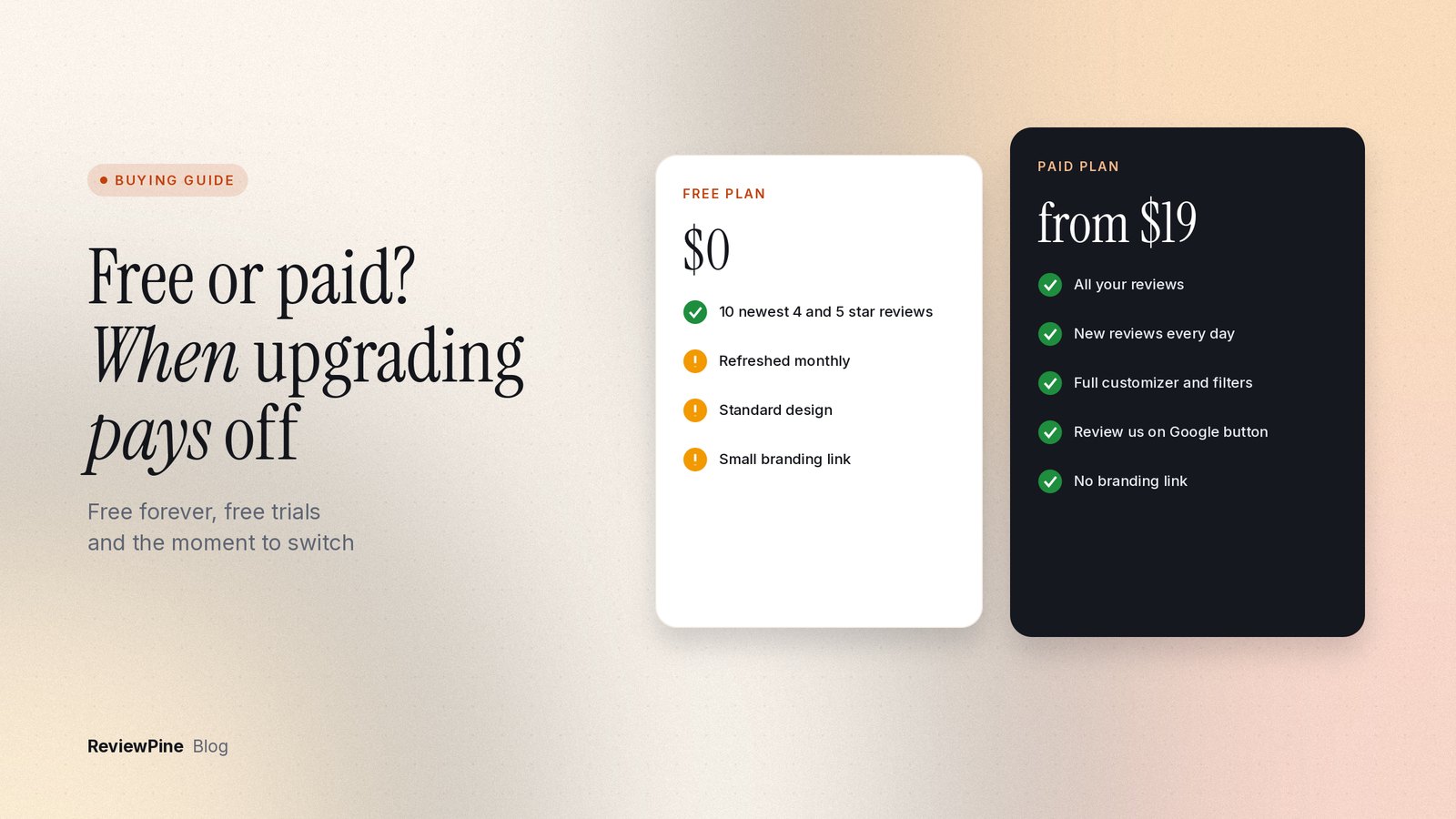
Here's how our two entry options compare. Every paid plan has every feature; the paid plans only differ in how many businesses they cover.
| Free | Starter ($19 a year) | |
|---|---|---|
| Businesses | 1 | 1 |
| Widgets | 1 | Unlimited for that business |
| Reviews shown | Your 10 newest 4 and 5 star reviews | Your most recent reviews, up to several hundred |
| New reviews added | Monthly | Daily, plus a manual refresh once a day |
| Design | Your own design | Full customizer: colors, fonts, corners, density, light and dark |
| Filters and pinning | No | Minimum rating, sort, minimum length, maximum reviews, up to 10 pinned |
| "Review us on Google" button | No | Yes, with your own text |
| ReviewPine link | Small "Free widget by ReviewPine" link | None |
| Views | No traffic cap | No traffic cap |
Moving from Free to a paid plan doesn't need any change to the code on your site. The same widget, in the same design, picks up all your imported reviews, your filters and pins, and the "Review us on Google" button. If you later go from Starter to a bigger plan, the unused time is credited. You can cancel at any time by switching off auto-renew, and the Free plan help page explains which widget stays live afterwards.
What paying won't fix#
A paid plan changes how your reviews look and how current they are. It doesn't change the reviews. It won't get you more of them; that's a separate job, done by asking customers. It won't put review stars next to your site in Google search either, because Google doesn't show them for a business's own reviews on its own site, widget or not (review schema and star ratings has the detail). And on ReviewPine it won't merge several locations into one feed. Each widget shows one business.
A ten-minute check before you decide#
- Open your Google Business Profile and count the reviews from the last 90 days.
- Open the page with your free widget and note the date of the newest review it shows.
- If the gap between the newest review on Google and the newest one on your site is longer than you'd be comfortable explaining to a customer, upgrade.
- If you need a second page, a second location, or the "Review us on Google" button, upgrade.
- If none of that applies, stay free, and set a reminder to look again in three months.
Next step#
If you haven't tried a widget yet, the 7-day free trial shows you every feature on your own site, and the Free plan takes over by itself afterwards. If you've already decided to pay, the pricing page lists every plan, and plans and pricing in our Help Centre covers the billing details.
Frequently asked questions
Is a free Google reviews widget good enough for a small business?
What happens when a widget's free trial ends?
Do free review widgets slow down a website more than paid ones?
Can I remove the vendor's link from a free widget?
Will I lose my design if I go back to the free plan?
Turn your Google reviews into your best salesperson
Show real Google reviews on any page of your website, with a "Review us on Google" button that brings in new ones. On paid plans, new reviews appear by themselves. Set up in about five minutes.
- Works on WordPress, Shopify, Wix and any site
- Paid plans update by themselves
- No cookies, loads after your page
Anjanee Shukla
Founder, Ainygo Technologies
Anjanee Shukla is the founder of Ainygo Technologies and has been working in the technology industry for over 15 years. He has helped businesses worldwide by developing more than 1,000 websites, web applications, and digital solutions. His expertise spans WordPress, web development, website maintenance, hosting, automation, and business technology. Through this blog, he shares practical advice, technical knowledge, and real-world solutions gained from years of hands-on experience.