Review Schema and Star Ratings in Google: What Still Works in 2026
Many businesses are promised gold stars in Google results from review markup on their own website. For local businesses that hasn't worked since 2019. What the rule says, what still earns stars, and where to focus instead.

On this page
- What is review schema?
- What changed in 2019?
- What can still get star ratings?
- Should I still add review markup to my website?
- What about AI search and structured data?
- What should local businesses do instead?
- What does good organisation markup look like?
- How do I spot a misleading "review stars" offer?
- The bottom line
Key takeaways
- Since September 2019, Google doesn't show review stars for local businesses or organisations reviewing themselves on their own site.
- This applies whether reviews are added by hand or through an embedded third-party widget.
- Review snippets still work for eligible types such as products, recipes, books, software and courses.
- Local businesses' most valuable stars appear automatically on their Google Business Profile in Maps and the local pack.
- Use accurate organisation markup for business details, and use on-site reviews for conversions, not for search stars.
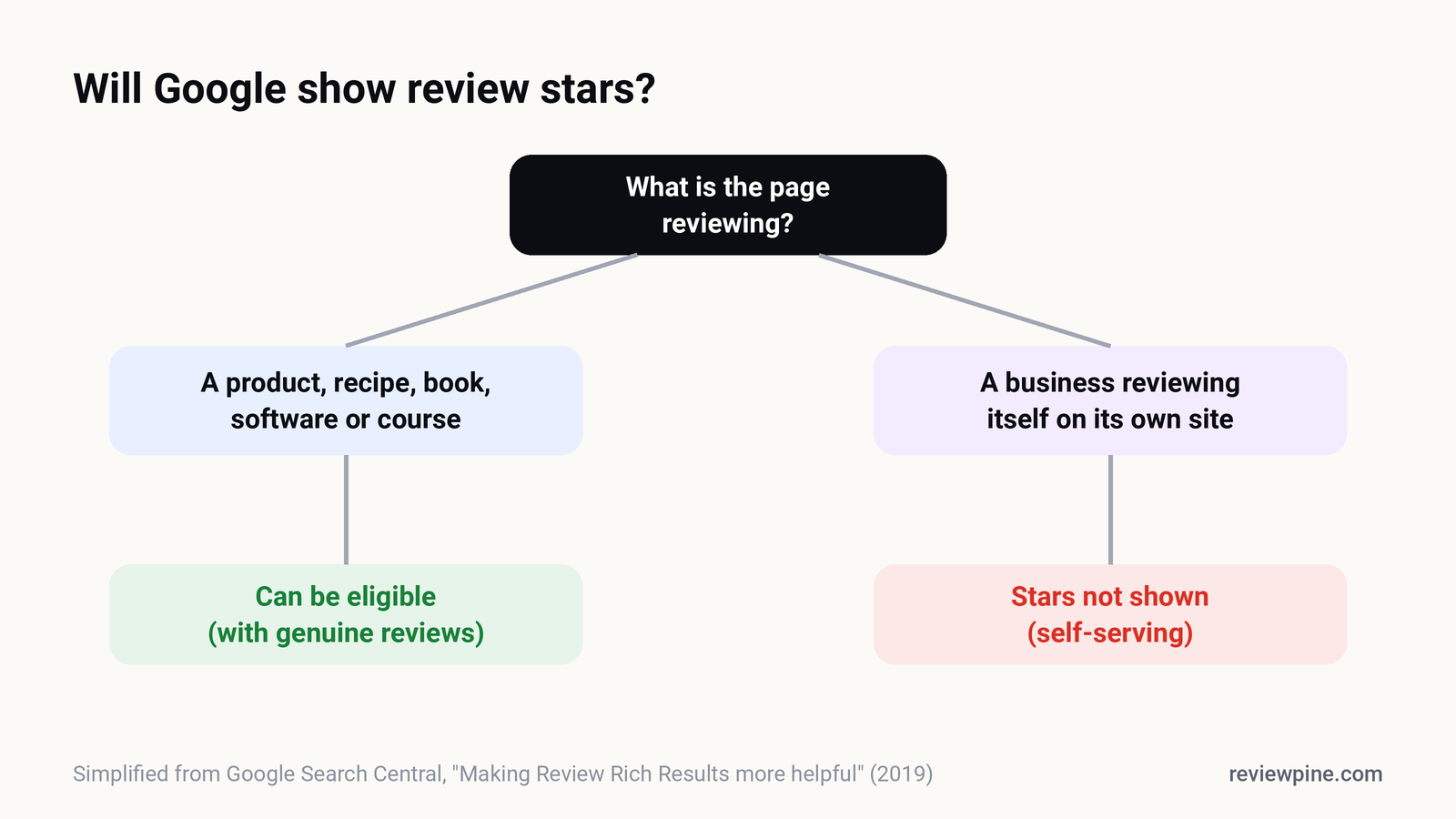
Review schema can still produce star ratings in Google search for certain things, such as products, recipes, books and software, but not for a local business or organisation reviewing itself on its own website. Since September 2019, Google treats reviews about a business shown on that business's own site as "self-serving" and doesn't display review stars for them, whether the reviews were added by hand or through an embedded widget.
If you've been promised gold stars next to your homepage in Google from "review schema", this is the guide to read first. It explains the rule, what still qualifies, and where review effort actually pays off for local businesses.
What is review schema?#
Review schema is structured data, usually in JSON-LD format, that describes reviews and ratings on a page in a way search engines can read. It uses vocabulary from Schema.org, such as Review and AggregateRating. When Google decides a page is eligible, it may show a review snippet in search results: star ratings, an average score and a review count under the page title.
What changed in 2019?#
In September 2019, Google published Making Review Rich Results more helpful. Two changes matter here:
- Self-serving reviews aren't shown. For
LocalBusinessandOrganizationtypes (and their subtypes), Google stopped showing review rich results when the entity being reviewed controls the reviews about itself, either written into its own markup or pulled in through an embedded third-party widget. - Eligible types were narrowed. Review snippets are limited to a specific list of schema types, such as products, books, recipes, software applications, courses and a few others.
Google noted that sites won't receive a manual action just for having self-serving review markup. The markup simply won't produce stars.
What can still get star ratings?#
| Situation | Stars possible? |
|---|---|
| Product pages with genuine customer reviews (e-commerce) | Yes, if the markup follows Google's product guidelines |
| Recipes, books, software apps, courses, events | Yes, for eligible review snippet types |
| Third-party review sites reviewing other businesses | Yes, when they're not the business itself |
| A local business marking up reviews about itself on its own site | No |
| A local business embedding a widget with its Google reviews | No (the widget makes it self-serving) |
| Your Google Business Profile in Maps and the local pack | Stars shown by Google itself, no markup needed |
The last row is the important one. For local businesses, the stars that matter most in Google already appear automatically: next to your Business Profile in Maps and the local results, based on your Google reviews. That's where review effort pays off. See do Google reviews help SEO?
Should I still add review markup to my website?#
For a local business's own reviews, there's little to gain in Google search, and some risk if it's done badly. Google's review snippet guidelines require markup to describe reviews visible on the page, from real users, about the specific item being reviewed. Markup that doesn't match the page, or that inflates ratings, can lead to the structured data being ignored or, in serious cases, a manual action.
A few situations where markup still makes sense:
- E-commerce product pages with your own genuine product reviews: use
Productmarkup withrevieworaggregateRating, following Google's product snippet rules. - Sites that review other businesses or products, like a directory or comparison site.
- Your organisation's basic details:
OrganizationorLocalBusinessmarkup with your name, logo, address and contact details is useful for knowledge panels and AI assistants, even without ratings.
ReviewPine's widgets deliberately don't inject review markup into your pages, because for a business's own reviews it wouldn't earn stars and could confuse your structured data.
What about AI search and structured data?#
AI assistants and AI search features draw on many sources, including Business Profiles, review platforms and the web pages that mention you. Clear, accurate organisation markup and well-written pages help them understand who you are. But the reviews that AI assistants weigh most are the independent ones on platforms like Google, not markup you add to your own site. More in Google reviews and AI search.
What should local businesses do instead?#
Put review effort where it produces results:
- Grow your Google reviews. They create the stars that appear in Maps and the local pack, and Google says review count and score affect local ranking. Start with how to get more Google reviews.
- Show reviews on your website for people, not for search engines. Their job on your site is conversion: persuading visitors who already found you. See where to put reviews on your website.
- Use accurate organisation markup for your business details, without self-serving ratings.
- Write genuinely helpful pages. Google's helpful content guidance rewards pages written for people, which is a better long-term bet than any markup trick.
What does good organisation markup look like?#
For most local businesses, the useful structured data is about who you are, not how good you are. A LocalBusiness (or a more specific subtype such as Dentist or Plumber) block on your homepage or contact page can describe:
| Property | Example |
|---|---|
name |
Green Valley Dental |
url and logo |
Your homepage and logo file |
address |
Full postal address, matching your Business Profile |
telephone |
The same number shown on Google |
openingHoursSpecification |
Your real opening hours |
geo |
Latitude and longitude of your premises |
sameAs |
Links to your Google Business Profile, Facebook and LinkedIn pages |
Leave out aggregateRating and review for your own business. They won't produce stars, and if they don't match what's visible on the page they can cause your structured data to be ignored. Test your markup with Google's Rich Results Test and the Schema Markup Validator after publishing.
Do product reviews on an online shop still get stars?#
Yes, when done properly. If you sell products and collect genuine reviews about each product on its own page, Product markup with review or aggregateRating can make the page eligible for product rich results. The reviews must be about that product, visible on the page, and written by real customers. Store-wide reviews ("great service, fast delivery") belong to your business, not to an individual product, so they shouldn't be marked up as product reviews.
How do I spot a misleading "review stars" offer?#
Be cautious if a tool or agency promises:
- guaranteed star ratings in Google for your business's homepage;
- "schema hacks" that mark up reviews pulled from Google as if they were your own;
- ratings in search results within days.
Ask them to show you a local business (not a product or a review site) that currently displays self-serving review stars in Google search for its own homepage. Google's 2019 change means such examples should be rare and short-lived.
The bottom line#
Review schema still works for products and a handful of other types. For a local business's own reviews on its own site, it doesn't produce stars, and hasn't since 2019. The stars that count for local businesses come from your Google Business Profile, and the reviews on your website earn their keep by converting visitors. ReviewPine focuses on exactly that: showing your real, current Google reviews where visitors decide, without adding markup that wouldn't help.
Frequently asked questions
Can I get star ratings in Google search for my local business website?
Does an embedded Google reviews widget count as self-serving?
Will I be penalised for having review schema on my site?
Which pages can still show review stars in Google?
Where do star ratings for local businesses come from in Google?
Turn your Google reviews into your best salesperson
Show real, always-fresh Google reviews on any page of your website, with a "Write a review" button that brings in new ones. Set up in about two minutes.
- Works on WordPress, Shopify, Wix and any site
- Updates itself every day
- No cookies, no slowdown
Anjanee Shukla
Founder, Ainygo Technologies
Anjanee Shukla is the founder of Ainygo Technologies and has been working in the technology industry for over 15 years. He has helped businesses worldwide by developing more than 1,000 websites, web applications, and digital solutions. His expertise spans WordPress, web development, website maintenance, hosting, automation, and business technology. Through this blog, he shares practical advice, technical knowledge, and real-world solutions gained from years of hands-on experience.