Google Reviews Widget: What It Is, How It Works and How to Choose One
A plain-English buyer's guide to Google review widgets: how they fetch and display reviews, the 10 features that actually matter, the privacy and speed questions to ask, and how to set one up in minutes.

On this page
Key takeaways
- A Google reviews widget is one line of embed code that displays your Google reviews and keeps them updated automatically.
- Compare widgets on refresh frequency, number of reviews, layouts, design control, filters, speed, privacy, accessibility, attribution and review collection.
- Daily refreshes matter because 74% of consumers only care about reviews from the last three months (BrightLocal, 2026).
- Choose a widget that loads asynchronously and lazily and sets no cookies.
- No widget can legitimately give your own business review stars in Google search results.
A Google reviews widget is a small piece of code you add to your website that displays your Google reviews in a designed layout, such as a slider, grid or badge, and keeps them up to date automatically. You paste one line of code into your site once; the widget provider fetches your reviews, stores them and serves them to your visitors, so new reviews appear without you touching your website again.
This guide explains how widgets work behind the scenes, the ten features worth comparing, the privacy and performance questions most people forget, and how to get one running.
How does a Google reviews widget work?#
The basic flow is the same for most providers:
- You connect your business, usually by pasting your Google Maps link or searching for your business name.
- The provider imports your reviews from Google and stores them.
- You design the widget: layout, colours, fonts, which reviews to show.
- You copy an embed code, typically one line of HTML, and paste it into your website.
- Visitors load your page, the widget script loads, fetches your stored reviews and displays them.
- The provider refreshes your reviews on a schedule, so new ones appear automatically.
Why use a widget instead of copying reviews?#
Copying reviews by hand is free but goes stale, loses names and dates, and looks unverifiable. Building your own integration with Google's API needs a developer and returns only a few reviews. A widget sits in between: quick to set up, automatically current, and designed to look credible. Our comparison of all four methods goes into detail.
The 10 features that actually matter#
1. How often reviews refresh#
The whole point of a widget is freshness. Daily refreshes keep your newest reviews visible; weekly or monthly ones mean visitors may see stale content. With 74% of consumers only caring about reviews from the last three months (BrightLocal, 2026), refresh frequency matters. See review recency.
2. How many reviews it can show#
Some tools rely on Google's API alone, which returns only a handful of reviews. Better widgets import and store your reviews, so you can show more and choose among them.
3. Layouts that fit your pages#
You'll want different layouts for different places: a carousel under your homepage headline, a list beside your contact form, a compact badge in the footer. Check whether one subscription lets you create several widgets.
4. Design control#
Colours, fonts, corner radius, light and dark modes, and how much of each review shows. The widget should look like part of your site, not a foreign object pasted in.
5. Filters and pinning#
Useful filters include a minimum star rating, hiding very short reviews and sorting by newest. Pinning lets you put your most relevant reviews first. Use filters honestly: show your overall rating and count alongside any selection (see review gating for where the line is).
6. Page speed impact#
A widget should never slow your page. Look for asynchronous loading (it doesn't block the page), lazy loading (it fetches reviews only when the visitor scrolls near it), a small script size and reserved space to avoid layout shifts. Test with PageSpeed Insights before and after.
7. Privacy and cookies#
Does the widget set cookies or track your visitors? If it does, you may need to mention it in your cookie banner and privacy notice, especially under GDPR or India's DPDP Act. A cookie-free widget keeps things simple.
8. Accessibility#
Reviews should be readable by screen readers, navigable by keyboard, with adequate colour contrast and accessible carousel controls. Accessibility helps every visitor, and in some markets it's a legal expectation.
9. Attribution and honesty#
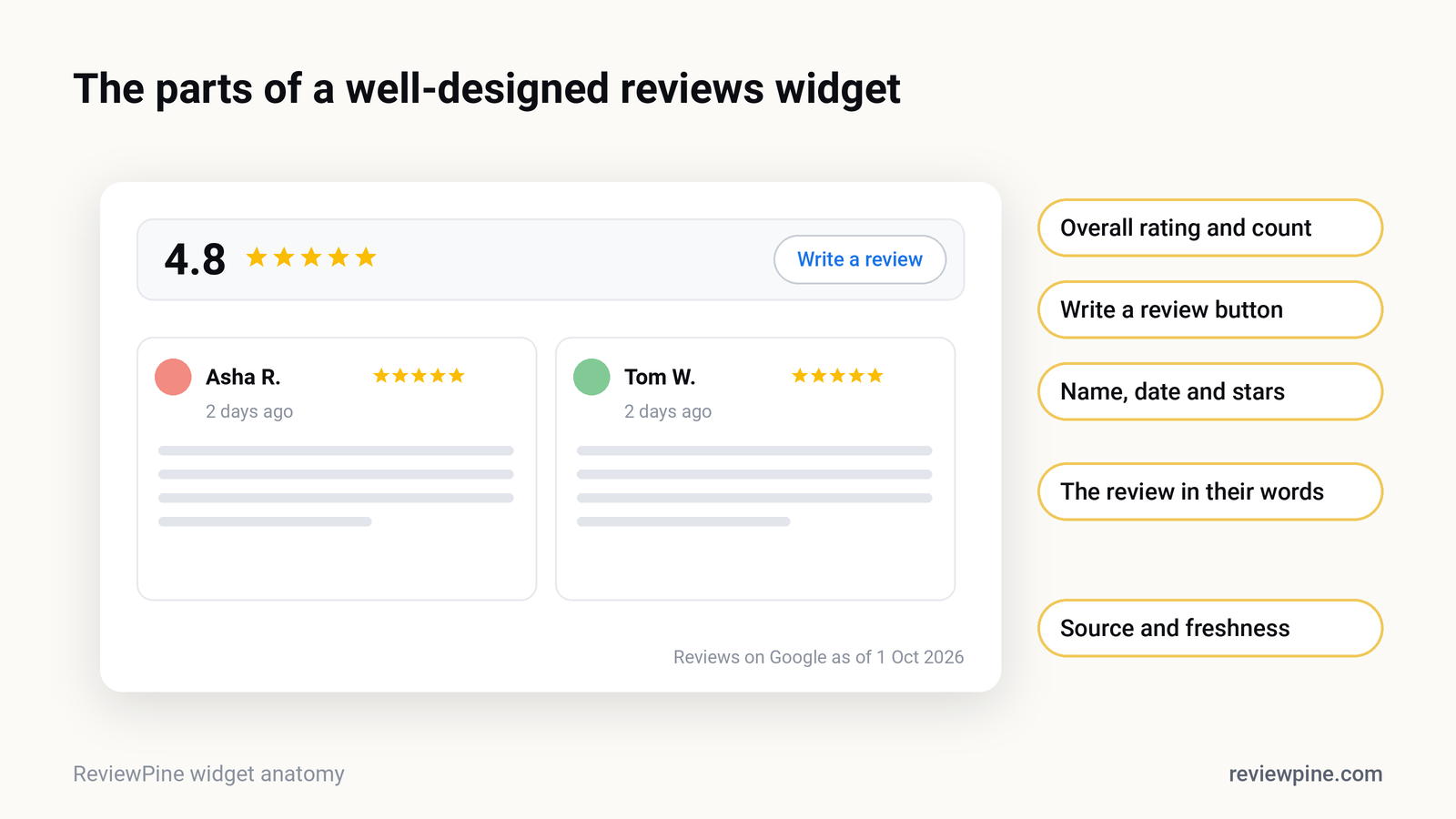
Good widgets show the reviewer's name, the date, the star rating, your overall Google rating and that the reviews come from Google. That context is what makes reviews more credible than testimonials. See testimonials vs Google reviews.
10. A way to collect new reviews#
The best widgets don't just display reviews; they help you get more. A "Write a review" button that opens your Google review form turns your website into a review-collection tool too.
A quick comparison checklist#
| Question to ask | Good answer |
|---|---|
| How often do reviews update? | Daily |
| How many reviews can I show? | Many, not just Google's API sample |
| Can I have several widgets and layouts? | Yes |
| Does it slow my page? | Async, lazy-loaded, small script |
| Does it set cookies? | No |
| Does it work on my platform? | Yes, with a single embed code for any site |
| Can visitors leave a review from it? | Yes, with a direct Google link |
| What happens if I stop paying? | Clear answer, no broken page |
| Is there a free trial or free plan? | Yes, so you can test on your real site |
What happens to my reviews if I cancel?#
Ask this before you sign up. Some widgets simply disappear, leaving a gap in your page. Others show a notice. Your Google reviews themselves are never affected; they stay on Google regardless of any widget. ReviewPine keeps one widget live on a free plan after the trial, showing your newest four and five star reviews with a small link to us, so your page doesn't suddenly lose its reviews.
Can a widget get me star ratings in Google search?#
No widget can legitimately give your own business review stars in Google search results. Since 2019, Google doesn't show review rich results for businesses displaying reviews about themselves on their own site, including through embedded widgets. Be wary of tools that promise otherwise; see review schema and star ratings.
How to set up a Google reviews widget#
With ReviewPine, the whole process takes about two minutes:
- Sign up and paste your Google Maps link. Your reviews import automatically.
- Pick a design from the widget gallery: slider, grid, list, badge or sidebar.
- Customise colours, fonts and filters, and pin your favourite reviews. You can try the customiser before signing up.
- Copy one line of code and paste it into your site: a Custom HTML block on WordPress, a Custom Liquid section on Shopify, or an embed element on Wix, Squarespace or Webflow.
Your reviews then refresh automatically, design changes appear on your site instantly, and the built-in "Write a review" button sends happy visitors straight to your Google review form.
The bottom line#
A good Google reviews widget does three things: shows your real, current reviews in a design that fits your site, stays out of the way of your page speed and privacy, and helps you collect more reviews. Use the checklist above to compare options, and test on your real website before you commit. Start a free ReviewPine trial to see your own reviews on your own site in a couple of minutes.
Frequently asked questions
What is a Google reviews widget?
Is there a free Google reviews widget?
How do Google review widgets get my reviews?
Do Google review widgets slow down websites?
Do review widgets use cookies?
Turn your Google reviews into your best salesperson
Show real, always-fresh Google reviews on any page of your website, with a "Write a review" button that brings in new ones. Set up in about two minutes.
- Works on WordPress, Shopify, Wix and any site
- Updates itself every day
- No cookies, no slowdown
Anjanee Shukla
Founder, Ainygo Technologies
Anjanee Shukla is the founder of Ainygo Technologies and has been working in the technology industry for over 15 years. He has helped businesses worldwide by developing more than 1,000 websites, web applications, and digital solutions. His expertise spans WordPress, web development, website maintenance, hosting, automation, and business technology. Through this blog, he shares practical advice, technical knowledge, and real-world solutions gained from years of hands-on experience.