How to Get More Google Reviews: 12 Proven Ways That Follow the Rules
Most happy customers never leave a review because nobody asked them at the right moment. Twelve practical ways to get a steady flow of Google reviews, without breaking Google's rules.
On this page
- Why don't happy customers leave reviews on their own?
- 1. Get your direct Google review link
- 2. Ask at the moment of peak satisfaction
- 3. Ask in person, then follow up in writing
- 4. Use WhatsApp or SMS, not just email
- 5. Put a QR code where customers wait
- 6. Add the link to everything you already send
- 7. Make your team part of it
- 8. Put a "Write a review" button on your website
- 9. Reply to every review you get
- 10. Follow up once, then stop
- 11. Ask long-standing customers too
- 12. Make it a weekly habit, not a campaign
- What should you never do?
- How many reviews should you aim for?
- Turn new reviews into new customers
Key takeaways
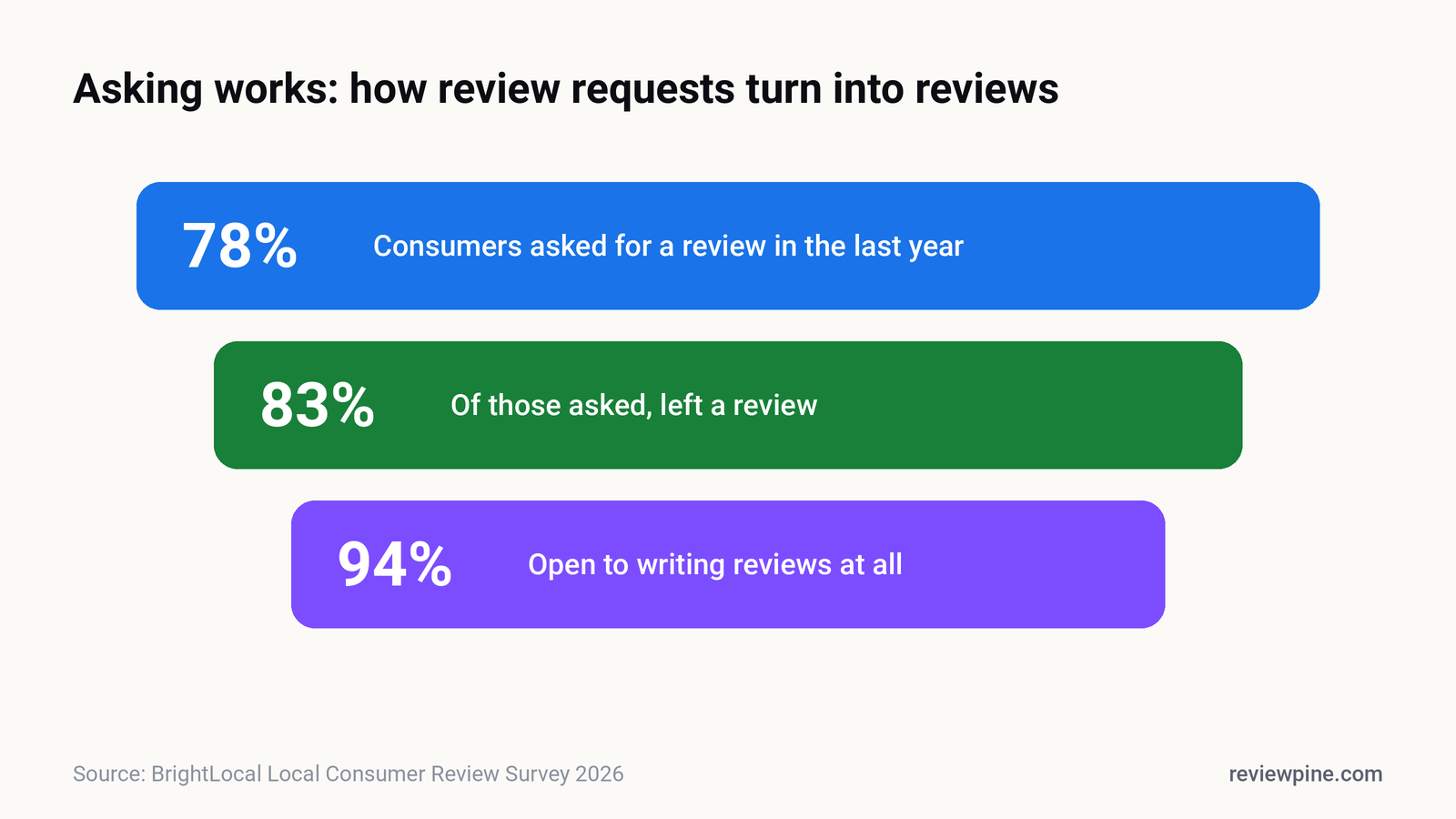
- 83% of consumers who were asked to leave a review went on to write one (BrightLocal, 2026).
- Ask every customer at the moment they're happiest, with a direct link to your Google review form.
- Combine a personal ask with a written follow-up by WhatsApp, SMS or email.
- Add your review link to receipts, confirmations and your website so it works without anyone remembering.
- Never offer rewards for reviews or ask only happy customers; both break Google's policies.
- Aim for a steady weekly flow: 74% of consumers only care about reviews from the last three months.
The most reliable way to get more Google reviews is to ask every customer, at the moment they're happiest, with a direct link that opens your Google review form in one tap. In BrightLocal's 2026 survey, 83% of consumers who were asked to leave a review went on to write one. The businesses with the most reviews aren't luckier; they ask more often and make it easier.
This guide sets out twelve methods that work for local businesses, from a one-person salon to a multi-location clinic. Every one of them stays within Google's review policies, because a review profile built on shortcuts can be wiped out overnight.
Why don't happy customers leave reviews on their own?#
Because they're busy, and because nothing prompted them. Unhappy customers have a reason to write: they want something fixed or they want to warn others. Happy customers simply go back to their day. The result is a review profile that under-represents your good work.
The fix isn't persuasion, it's prompting. BrightLocal's 2026 data shows 94% of consumers are open to writing reviews, and 28% say they will "always" write one if asked, up from 16% a year earlier. The demand is there. Most businesses just never make the request.
1. Get your direct Google review link#
Everything below depends on one thing: a link that opens your review form directly, with the stars ready to tap. Sending people to your Maps listing and hoping they find the "Write a review" button loses most of them.
You can get the link from your Google Business Profile. Search for your business name on Google while signed in to the account that manages it, and use the option to ask for reviews, which gives you a short link and a QR code. Save the link somewhere your whole team can find it. You'll use it everywhere.
2. Ask at the moment of peak satisfaction#
Timing changes everything. The best moment is right after the customer experiences the value: when the haircut is finished and they're looking in the mirror, when the car is handed back clean, when the parcel arrives, when the patient feels better. Ask then and you're asking someone who is already grateful.
| Business type | Best moment to ask |
|---|---|
| Salon, spa, clinic | At checkout, while they're still smiling |
| Restaurant, café | With the bill, or by message the same evening |
| Home services | When the job is signed off, before you leave |
| E-commerce | 2 to 3 days after delivery, once they've used it |
| B2B, agencies | After a milestone or a result the client is pleased with |
3. Ask in person, then follow up in writing#
A personal ask works because it's human. "We really rely on Google reviews, would you mind writing a quick one about today?" is enough. Then send the link by message within the hour, so the person can act on their promise without searching for you.
The in-person ask creates the commitment. The written follow-up removes the friction. Doing only one of them leaves most reviews on the table.
4. Use WhatsApp or SMS, not just email#
For most local businesses, especially in India, a short WhatsApp message gets read far faster than an email. Keep it personal, mention what you did for them, and put the link on its own line. We've written ready-to-send versions for different industries in our review request templates.
Tip: Send review requests from a number customers recognise, ideally the one they already used to book or chat with you. A message from an unknown number looks like spam.
5. Put a QR code where customers wait#
A small printed card with a QR code at the counter, on the table, on the receipt or on the treatment room wall turns idle moments into reviews. Keep the message short: "Happy with today? Tell others on Google" and the code. Don't stand over people while they scan it. Google's guidance discourages pressuring customers, and a review written under someone's gaze isn't worth much anyway.
6. Add the link to everything you already send#
You already send customers things: booking confirmations, invoices, delivery updates, thank-you emails. Add one line and your review link to each. This takes ten minutes to set up once and then works forever, without anyone remembering to ask.
7. Make your team part of it#
Reviews often mention people by name. Share good reviews with your team every week, celebrate them, and make asking a normal part of the job. One caution: don't tell customers which staff member to name in their review, and don't set up rewards that pay staff per review collected. Both push towards the kind of scripted, pressured reviews platforms are trying to stop.
8. Put a "Write a review" button on your website#
Some of your happiest customers visit your website after the job: to rebook, to check opening hours or to find your number. Give them a clear "Write a review" button that opens your Google review form directly. ReviewPine's widgets include this button by default, next to the reviews you're showing, so the page that displays your reviews also collects new ones. We cover placement in where to put reviews on your website.
9. Reply to every review you get#
Replying is a signal to future reviewers that someone reads them. BrightLocal found 80% of consumers are more likely to use a business that responds to all of its reviews, and 89% expect owners to reply. People are more willing to write when they can see their words will be noticed. See our guides to replying to positive reviews and handling negative ones.
10. Follow up once, then stop#
Many people mean to leave a review and forget. One polite reminder, two or three days later, often doubles the response. After that, stop. Repeated reminders irritate the customer you worked hard to please, and a review written to make the messages stop isn't the review you want.
11. Ask long-standing customers too#
Your most loyal customers are often your least-reviewed, because they started coming before you thought about reviews. A short personal message to regulars, explaining that reviews help new people find you, usually gets a warm response and some of the most detailed reviews you'll ever receive.
12. Make it a weekly habit, not a campaign#
A burst of fifty reviews in one week followed by silence looks odd to readers and does less for you than four a week, every week. BrightLocal found 74% of consumers only care about reviews written in the last three months, and 32% look for ones from the last two weeks. A steady flow keeps your profile current. We explain why in review recency.
What should you never do?#
These shortcuts are tempting, common, and dangerous:
| Don't | Why |
|---|---|
| Offer discounts, gifts or lucky draws for reviews | Google prohibits incentivised reviews; in the US the FTC can fine businesses for buying reviews |
| Ask only happy customers | Selective asking, known as review gating, breaks Google's policy |
| Write reviews yourself, or ask staff and family | It's fake engagement, and platforms remove it and can restrict your profile |
| Buy reviews from agencies | They're detected in batches, and removal often takes genuine reviews with them |
| Set up a review station on your premises | Many reviews from one device and location look manipulated |
| Pressure customers or ask them to change a review | It's against platform rules and it damages the relationship |
Important: In the US, the FTC's Consumer Reviews and Testimonials Rule has been in force since October 2024. It bans buying positive or negative reviews and writing fake ones, including AI-generated reviews, with civil penalties for knowing violations. See our guide to fake review laws.
How many reviews should you aim for?#
More than your closest competitors, and enough to clear the thresholds buyers use. BrightLocal found 47% of consumers won't use a business with fewer than 20 reviews, while only 9% are comfortable with five or fewer. Our guide on how many Google reviews you need shows how to set a target for your market.
Turn new reviews into new customers#
Getting reviews is half the job. The other half is making sure the people deciding whether to hire you actually see them, on your website, right next to the button you want them to press. ReviewPine displays your latest Google reviews on any site with one line of code, refreshes them automatically, and includes the "Write a review" button that keeps new ones coming in.
Frequently asked questions
What is the fastest way to get more Google reviews?
How do I get my Google review link?
Can I offer a discount in exchange for a Google review?
Is it allowed to ask only happy customers for reviews?
How often should I ask for reviews?
Turn your Google reviews into your best salesperson
Show real, always-fresh Google reviews on any page of your website, with a "Write a review" button that brings in new ones. Set up in about two minutes.
- Works on WordPress, Shopify, Wix and any site
- Updates itself every day
- No cookies, no slowdown
Anjanee Shukla
Founder, Ainygo Technologies
Anjanee Shukla is the founder of Ainygo Technologies and has been working in the technology industry for over 15 years. He has helped businesses worldwide by developing more than 1,000 websites, web applications, and digital solutions. His expertise spans WordPress, web development, website maintenance, hosting, automation, and business technology. Through this blog, he shares practical advice, technical knowledge, and real-world solutions gained from years of hands-on experience.